



Visual Coding, Zero Syntax.
Stop guessing what a script does. Just drag, drop, and connect steps like a mind map. Finally, automation you can actually see and understand.
Create Workflows that think.
Standard Actions are blind—they just repeat steps. ezActions checks your images first: Is it too small? Is it a text layer? It adapts instantly.
Total Context Awareness.
Don’t just edit “everything.” Tell Photoshop to only touch layers named “Shadow” or only export visible folders. Access details normal Actions can’t reach.
Complex Workflows Made Easy.
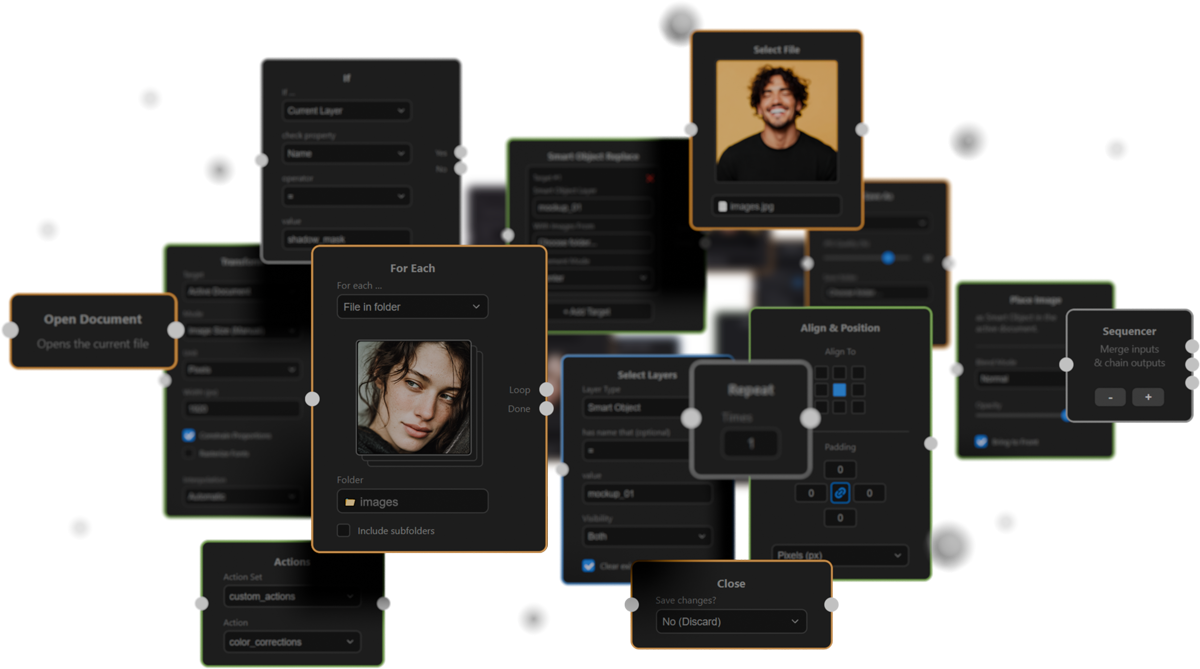
How Visual Scripting Works: Drag functional blocks (Nodes) onto the canvas and link them to control your workflow’s data flow.
In the example above, we iterate through an entire folder, check every image against specific criteria (like file format or layer name), and only execute changes if your conditions are met.
No Code. No Syntax Errors. Pure Logic.
What is ezActions? It is a node-based automation plugin for Adobe Photoshop.
It bridges the gap between simple Photoshop actions and complex scripting. While traditional actions are rigid and linear, ezActions empowers you to create intelligent, dynamic processes through a visual interface—without writing a single line of code.
-
Visual Logic: Build workflows by connecting nodes. Maintain a clear overview of even the most complex automation sequences.
-
Intelligent Decisions: Use
If/Elseconditions to execute Photoshop actions only when specific criteria are met. -
Batch process multiple folders in Photoshop: Effortlessly process entire folder structures (including subfolders) using the powerful
For Eachnode. -
Total Control: Seamlessly integrate your existing Photoshop actions into modern, flexible automation chains.
ezActions transforms Photoshop from a simple editing tool into a high-performance productivity engine.
Automation that unleashes creativity
The creative process in Photoshop is constantly interrupted by technical repetition. Whether you are generating mockup series, precisely exporting assets, or manually resizing images—these repetitive tasks steal time that belongs to your actual design work.
ezActions breaks you free from the rigid lists of classic Photoshop Actions. By dragging and connecting simple building blocks, you determine how information flows and what decisions the system should make for you.
Build your visual blueprint once, save it, and let Photoshop do the heavy lifting. You don’t just become faster; you get the absolute certainty that your processes run consistently and flawlessly. Stop acting like a robot, and focus entirely on creating again.